Arrow plots are one of two different stream visualization options the Streamalizer supports. Using an arrow plot the direction of a stream can be sampled and displayed in regular intervals. Streamalizer provides different ways of defining the grid intervals as well as the visual behaviour of the plotted arrows.
User Interface
To set up options for arrow plotting select the tab captioned "Arrow plot". The first part holds options for grid construction - either relative to the data set extents or relative to the rendering area. Next come options for selecting and using a glyph followed by options for arrow plot color coding. Finally you can select to include exclude arrow plotting from the rendering process.
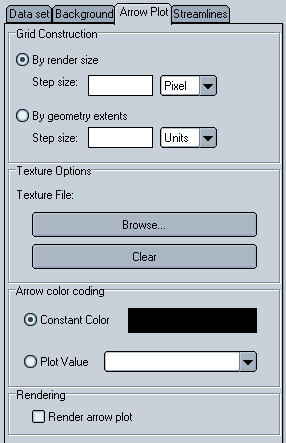
Figure: The Arrow plot user interface
Grid construction options
Arrow plots are distributed evenly over the rendering positioned along the edges of a regular grid. This grid can be constructed either relative to the data set geometry or relative to the rendering form area.
When constructing to the rendering form area ("By render size") you can choose to plot an arrow every N pixels or at intervals of N percent of the rendering form size.
If you want to construct the grid relative to the data set geometry ("By geometry extents") you can define arrows to be placed either every N units or at intervals of N percent.

